Per-employee fee. Your cost does not grow with your team
Employees on a single license
Currency supported, including OMR, AED, SAR and USD
Full interfaces, English and Arabic
A complete staff payroll and salary management system
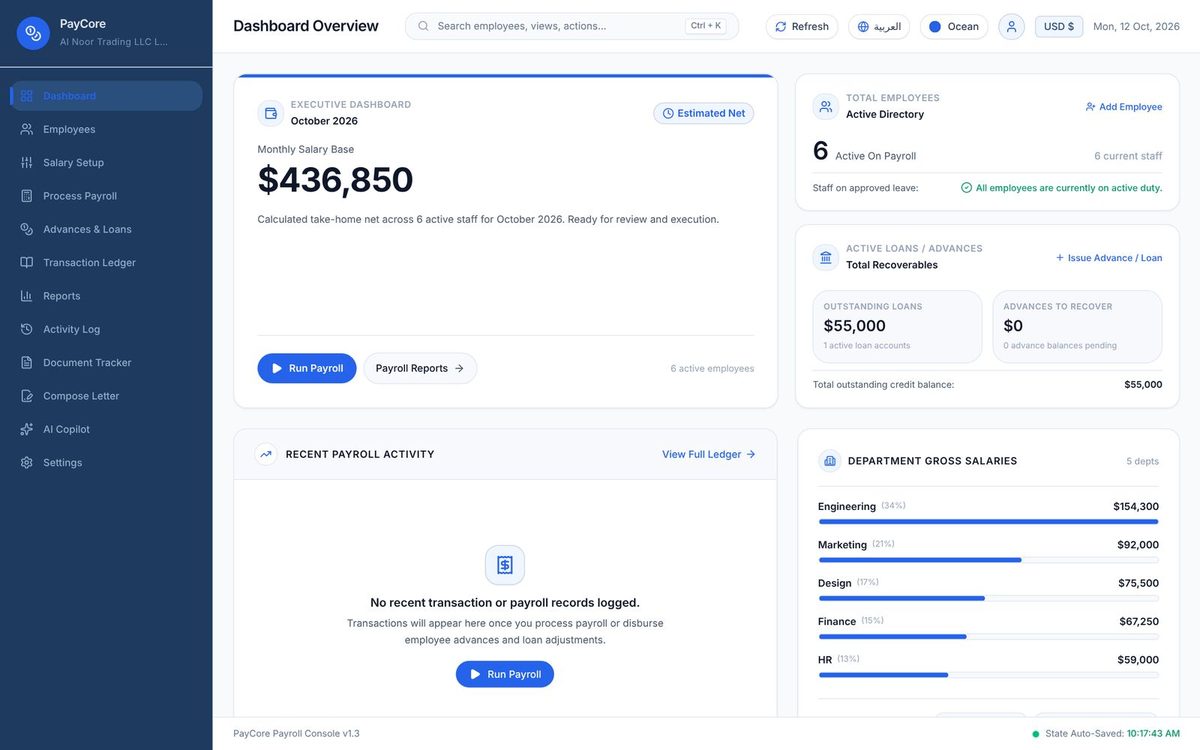
From the first employee record to the final payslip, PayCore handles the complete monthly payroll cycle for small and growing businesses, in any country.
Staff management
Store every employee's details, joining date, department and salary structure, including housing, transport and custom allowances.
Payroll in minutes
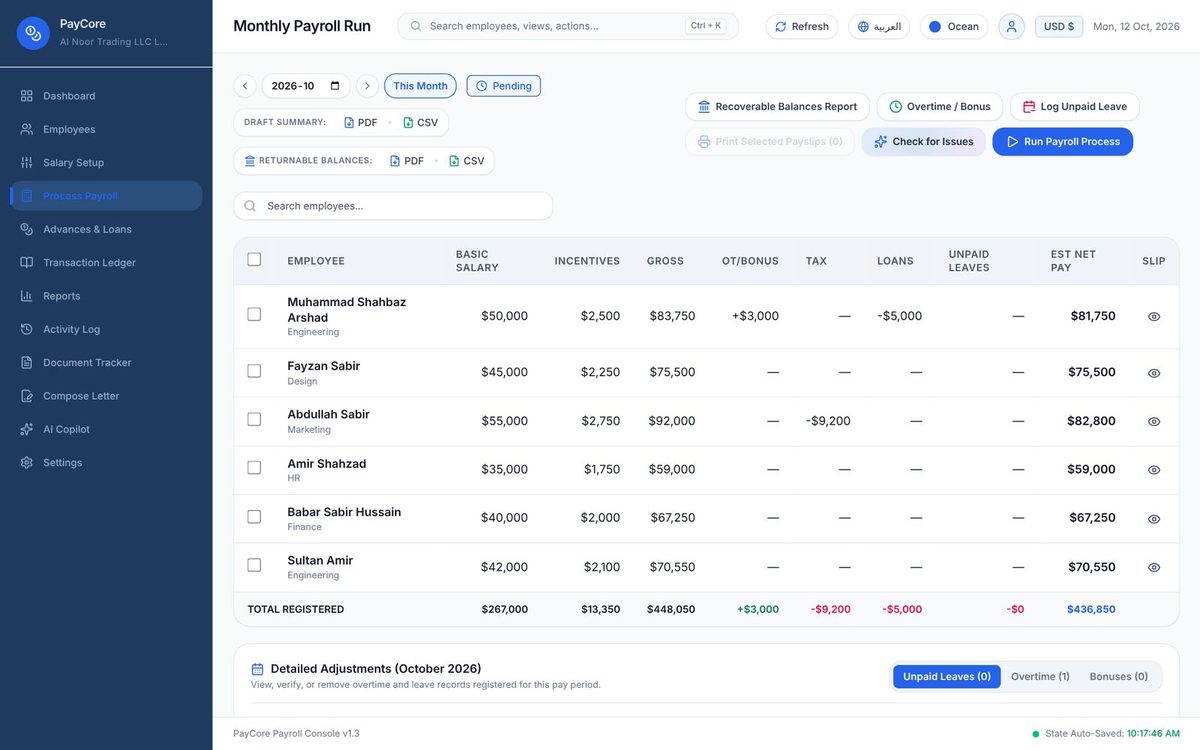
Overtime, bonuses, unpaid leave and tax are calculated automatically, along with end-of-service gratuity. Review the figures, approve, and the month is done.
Employee loans & salary advances
Issue staff loans and salary advances with automatic monthly recovery from payroll. Pause, adjust or record early repayments at any time.
Payslip generator & reports
Professional PDF payslips with your company details, plus payroll summaries and Excel exports ready for your accountant or bank.
Complete audit trail
Every salary, loan, repayment and adjustment is recorded with its date, giving you a full payment history for audits and staff queries.
Document expiry tracking
Keep trade licenses, visas, IDs and insurance records in one place, with dashboard reminders before anything expires.
Your payroll data stays under your control
- Fully offline. All payroll data is stored on your own computer. No cloud account, and no internet connection required.
- Protected access. A PIN lock keeps salary information private, even on a shared office computer.
- Backup and restore. Back up to any folder or USB drive and restore on any computer in seconds. Store backup files securely, as they are not encrypted.
- Built for regional payroll. Any currency, 3-decimal Gulf currencies, WPS bank-transfer rules and a complete Arabic interface.
One-time purchase vs. subscription payroll
Subscription payroll tools charge for every employee, every month. Here is how PayCore compares.
Download PayCore payroll software for Windows
Choose the installer for standard use, or the portable edition to run PayCore from a USB drive without installation. Your license key is requested the first time you open the app.
Installer
Standard Windows setup with desktop and Start menu shortcuts.
PayCore-Payroll-Setup.1.0.0.exe · 123 MB Download installerPortable
Runs from a single file with no installation. Ideal for USB drives and managed office PCs.
PayCore-Payroll-Portable.1.0.0.exe · 123 MB Download portableAbout the Windows security prompt
On first launch, Windows may display "Windows protected your PC". This is standard for independently published software without a commercial code-signing certificate, and appears only once per computer.
- Click More info.
- Click Run anyway.
Get your one-time PayCore license
PayCore licenses are sold directly by our team. Contact us on WhatsApp or by email, and your license key is typically issued the same business day.
Contact sales
Send us your name, company name and the email address the license should be registered to.
Complete payment
We confirm the payment options with you. One payment, with no renewals or per-employee charges.
Activate
Enter your email and license key in PayCore. Activation works offline and takes under a minute.
Book a free live demo
See PayCore in action before you buy. Our team will take you through a complete payroll cycle on a video call, from employee setup to final payslips, and answer your questions.
Customised for your company
Need a specific report, allowance rule or payslip layout? Our team can build custom features into PayCore for your business. Share your requirements and we'll prepare a quote.
About PayCore
Most payroll software is sold as a subscription priced per employee. As your team grows, so does the bill, every month, for as long as you use it.
PayCore was built to change that. One license covers unlimited employees, the software runs on your own computer, and your payroll data never leaves your control.
Development and support are handled directly by the PayCore team, so every question is answered by the people who build the software.
Frequently asked questions
Is there payroll software without a monthly subscription?
Yes. PayCore is a one-time purchase: you pay once for a license, with no subscription, no renewal and no per-employee charges.
Is PayCore free?
Downloading PayCore is free, and so is a live demo with our team. To use it you need a license, which is a one-time payment: no monthly fee, no subscription and no charge per employee.
Can I try it before I buy?
Yes. We offer a free live demo by video call. Contact us on WhatsApp or by email to arrange a time.
Does PayCore payroll software work offline?
Yes. Payroll, reports, backups and activation all work offline. Only the optional AI assistant uses the internet, with your own Google Gemini API key.
What should a good salary management system include?
For a small business, look for employee records with salary structures, automatic monthly payroll with overtime and leave, loan and advance tracking, payslips and reports, and end-of-service calculations. Also check the pricing: per-employee subscriptions get expensive as you grow. PayCore includes all of these with a one-time license. Our salary software guide compares the options in more detail.
Can PayCore replace my Excel payroll sheet?
Yes. You enter your employees and their salary structure once, and PayCore calculates overtime, unpaid leave, loan installments and net pay every month, then produces payslips and an Excel report for your accountant.
Can I move it to a new computer?
Yes. Install PayCore on the new computer, activate it with the same email and license key, and restore your data from a backup.
Does it handle payroll in Oman and the Gulf?
Yes. Omani Rial, Kuwaiti Dinar and Bahraini Dinar use 3 decimals, and AED, SAR and QAR are built in. PayCore also has a full Arabic interface, end-of-service gratuity with your own rate, and WPS bank-transfer rules for each employee.
What if I lose my license key?
Contact us with the email address the license was registered to, and we'll send it again.
Is my data safe?
Your payroll data stays on your computer and is never sent to us. The only exception is the optional AI assistant: if you turn it on, your payroll records are sent to Google with each question. Access is protected by a PIN, and backup files are not encrypted, so store them securely.
Run your next payroll with PayCore
Download PayCore today, or book a free demo and see it working with our team first.